Dev Proxy Tools MCP server
io.github.dev-proxy-tools/mcp·v0.3.1·4 starsMCP server for Dev Proxy that enables AI assistants to interact with Dev Proxy.
4 stars370 downloads/wk
Reviews
Write oneNobody has reviewed Dev Proxy Tools yet.
If you have run it, two minutes of your experience saves the next person an afternoon.
Dev Proxy Tools tools (3)
write = sends, deletes, buys or postsRead from the package source without running it. The installed server may list more.
FindDocsFinds the relevant Dev Proxy documentation for the given query
GetBestPracticesGets a list of best practices for configuring and using Dev Proxy. Call it for any code generation or operation involving Dev Proxy. These best practices do not change so once it has been called during the current session, you do not need to invoke it again. Returns a markdown string.
GetVersionGets the currently installed Dev Proxy version
Public scan report
scanner v0.1.10 · 2026-10-01 · same rubric, same numbers if you re-run it
- Code scan6 source files scanned25/25
- –Live reliabilityno gateway calls yet and no remote to proben/a
- –Tool poisoningtools not inspected (local package is not executed); not countedn/a
- Auth qualitylocal package, no credentials required12/15
- Maintenancelast push 0 days ago15/15
- Maintainer identityregistry namespace matches repository owner; GitHub account older than a year9/10
How Dev Proxy Tools compares
Against every graded MCP server, from our own scans and uptime checks. Updated after each scan run.
- Safety score
- 94/100
- higher than 96% of 48,255 servers
- Tools
- 3
- the typical server has 7
- Tools that change things
- 0%
- typical: 0%. Fewer write tools means less an agent can break
- GitHub stars
- 4
- more than 82% of 28,688 servers
- Downloads a week
- 370
- more than 84% of 12,191 servers with a package
What its tools let an agent do: 3 read
Install Dev Proxy Tools in Claude Code, Cursor or VS Code
Runs npx -y @devproxy/mcp on your machine. Read the scan report first; the gateway never runs local packages.
claude mcp add mcp -- npx -y @devproxy/mcp
What the publisher says
From the Dev Proxy Tools repository's README, as published. We do not edit it. Read it on GitHub
Dev Proxy MCP Server
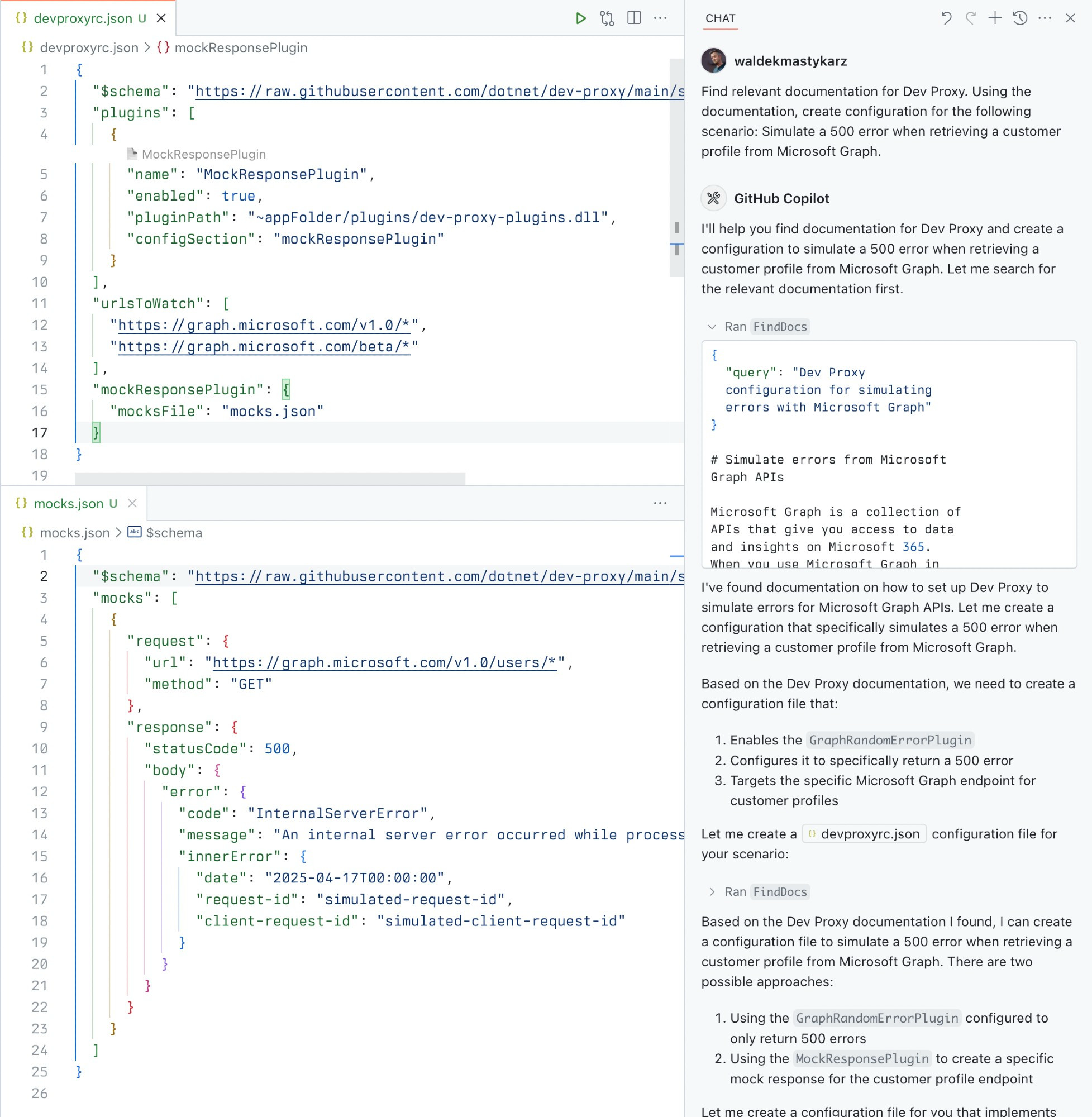
A Model Context Protocol (MCP) server for Dev Proxy that enables AI assistants to interact with Dev Proxy capabilities using the MCP standard. Use this server to:
- Create Dev Proxy configurations using natural language
- Get contextual help for working with Dev Proxy
- Discover Dev Proxy features and capabilities
What is Dev Proxy?
Dev Proxy is an API simulator that helps you effortlessly test your app beyond the happy path. It allows you to:
- Test API error handling: See how your app responds to API errors without changing your code
- Verify rate limit handling: Simulate API rate limits to improve user experience
- Test slow API responses: See how your app handles slow APIs to implement necessary affordances
- Create mock APIs: Quickly stand up mock APIs without writing code you won't ship
Dev Proxy works with any type of app and tech stack as it intercepts network requests at the proxy level.
What This Package Does
This package provides a Model Context Protocol (MCP) server interface to Dev Proxy. It allows AI assistants and other MCP-compatible clients to:
- Find Dev Proxy documentation using natural language queries
- Get the installed Dev Proxy version
Prerequisites
- Node.js LTS
- Dev Proxy installed globally
Usage
To set up and use the MCP server, refer to the instructions for your MCP host, such as Visual Studio Code. The Dev Proxy MCP server is published on npm under @devproxy/mcp.
Use the following values:
- Type: stdio
- Command: npx
- Arguments:
- -y
- @devproxy/mcp
- Environment: none
[!TIP]
If you want to test the preview version of the server using @devproxy/mcp@next.
Connect with an MCP Client
This MCP server exposes the following tools:
GetBestPractices
Gets a list of best practices for configuring and using Dev Proxy. Call it for any code generation or operation involving Dev Proxy. These best practices do not change so once it has been called during the current session, you do not need to invoke it again.
_Best practices in markdown_FindDocs
Finds relevant Dev Proxy documentation related to a specific query.
{
  "query": "How to simulate API errors"
}
GetVersion
Gets the currently installed Dev Proxy version. This is useful to ensure that the generated configuration is compatible with the installed version of Dev Proxy.
{}Development
# Clone the repository
git clone https://github.com/waldekmastykarz/dev-proxy-mcp.git
cd dev-proxy-mcp

# Install dependencies
npm install

# Build the project
npm run build

# Run the server
npm start
Shortened. The full README is on GitHub.
Nothing above is checked by us. What we check is on the safety report.
Dev Proxy Tools: common questions
- Is Dev Proxy Tools MCP server safe?
- Yes, by our scan: it is graded A (94/100). Read the Dev Proxy Tools safety report
- How do I install Dev Proxy Tools?
- It runs on your machine. Copy the Claude Code, Cursor, VS Code or Claude Desktop config from the install section.
- Does Dev Proxy Tools need an API key?
- Not as far as the registry entry and our scan can tell: no credentials are declared or required.
- Is Dev Proxy Tools maintained?
- The last commit was 34 days ago (2026-10-01). The latest release is v0.3.1.
- How does Dev Proxy Tools compare with other MCP servers?
- safety score 94/100 (higher than 96% of 48,255 servers); tools 3 (the typical server has 7); tools that change things 0% (typical: 0%. Fewer write tools means less an agent can break). Full comparison.